
Skip to content

One app. Your whole city.

Alert your people, dodge the jams, get it delivered. Free, no account, and it works offline.

Work with Connect RDC
The customer places a request
1/6

The customer places a request

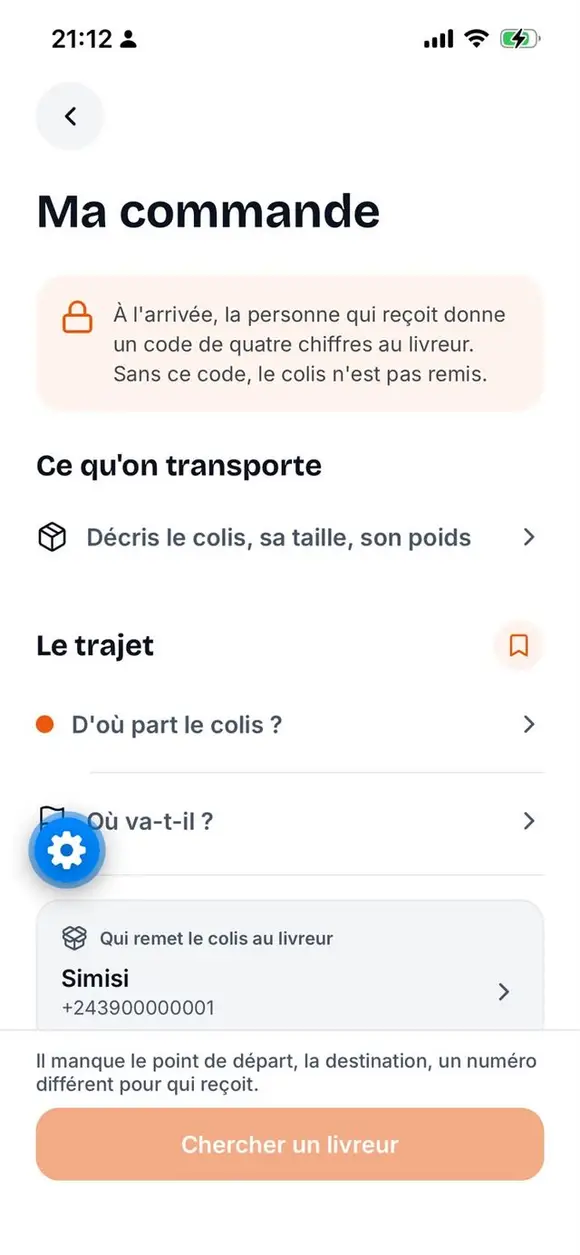
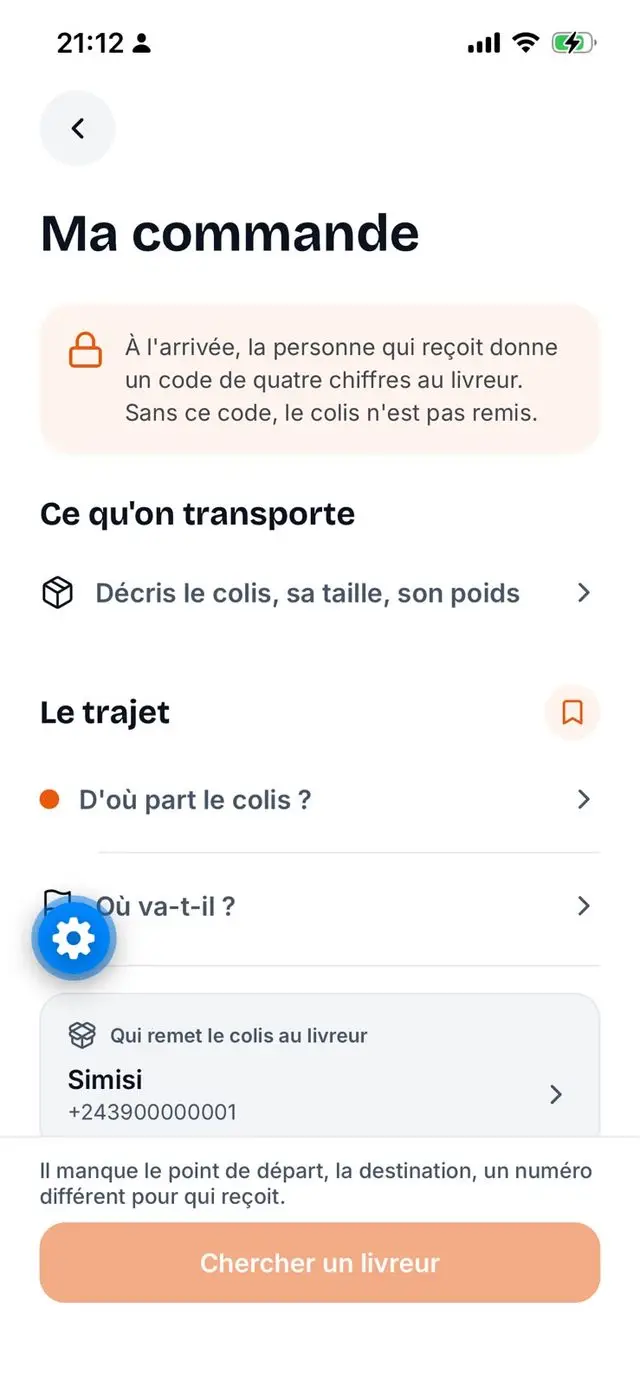
In the app: pickup point, destination, parcel. The price is shown before confirming.

Why Connect RDC exists

In Kinshasa you lose two hours a day in traffic. The emergency number is saturated the moment you need it. Getting a parcel across town means improvising. The apps that claim to answer all this come from elsewhere: heavy, in English, built for 4G.

  • The network drops

    → What matters stays readable offline: your emergency contacts, the services, the procedures, and a delivery already under way.

  • Data is expensive

    → A light app, compressed images, pagination everywhere. Nothing loads for nothing.

  • Not everyone reads French

    → French, English and Lingala, everywhere in the app and on this site.

  • Work is scarce

    → Every trip feeds a courier, every kiosk earns its commission, every company finds its clients.

Who it is for, and what it changes

One app, three ways to use it. Here is what each side gains, concretely.

You, day to day

Getting a parcel across town meant improvising: a friend who was free, a taxi, and a price argued on arrival.

  • The price before you say yes

    The amount shows in CDF before you confirm. No more haggling on arrival.

  • You choose your courier

    Couriers nearby see your request and make their offers. You compare, you decide.

  • You know where your parcel is

    Follow the ride on the map and chat with the courier from pickup to handover.

  • Proof on both sides

    The parcel is handed over only against your code, or your QR. The receipt follows right away.
Download the app

You already ride

You have a bike and time, but jobs come by word of mouth, and you get paid whenever.

  • Jobs to take, near you

    Three tabs, no more: what is available, what you offered, what you are running.

  • You set your offer

    You see the job and its price before accepting. Deliveries and purchases stay separate: they are two different jobs.

  • Top up where you are

    Your account tops up by mobile money in the app, or in cash at a kiosk agent.

  • Your earnings, in the open

    Earnings and history in “My account”. You work independently or attached to a company.

Become a courier

You run a company

Your jobs are tracked by phone, your rates are rebuilt for every client, and by evening nobody really knows how the day went.

  • Your day in one screen

    Today’s jobs and the gap with yesterday, the month’s revenue, jobs to assign, couriers online, and the last seven days as a chart.

  • Your rates, filled once

    Zones, communes, sectors, services, storage: the grid is filled once, then every quote starts from it.

  • A price held by the contract

    A job’s price is computed from the contract the client accepted. Changing your grid changes no running contract.

  • Team, clients and stock in one place

    Your couriers, your clients, your jobs and your warehouse in the same app, with no spreadsheet on the side.

Register my company

Everything a citizen needs.

  • Services & info

    The right contacts and procedures in one place: emergencies, health, administration, transport. No account, and readable offline.

  • Delivery & shopping

    Send a parcel or buy and get it delivered. Clear quote, live courier tracking on the map, vetted couriers and companies.

  • SOS & safety

    One tap to alert your contacts. Pick the audience: family, community or authorities.

  • Connect Vert

    Bring your sorted waste to an approved drop-off point. The keeper scans your QR, your points are credited and convert into data, vouchers or mobile money.

  • Live traffic

    Report and dodge the jams. Incidents near you, kept fresh by citizens.

  • DRC diaspora

    Stay tied to the country from abroad: news, consular procedures and services built for those living away.

  • Jarvis (Tonton Sim’s)

    Your Connect RDC assistant. Ask by voice or text, it guides you, 24/7.

What Connect RDC does for you

Your assistant

Tonton Sim’s answers, and never decides for you

Tell him what you need, by voice or keyboard, in French, English or Lingala. He understands, shows you what he understood, and waits for your go-ahead before acting.

There is a jam on the boulevard

I am reporting a traffic jam at your position. Shall I?

Yes, report it

Reported. Drivers around you will see it.

Nothing is sent until you say yes. That is the rule, for every action of his.

What you can ask him

  • Emergencies

    • « Where are the nearest emergency services? »
    • « What can I report as an emergency? »
  • Traffic

    • « How is the traffic? »
    • « Report a traffic jam »
  • My contacts

    • « Add an emergency contact »
    • « Show my emergency contacts »
  • By voice or keyboard

    Speak to him in French, English or Lingala. If the microphone is missing, the screen says so and the keyboard takes over.

  • He proposes, you confirm

    He shows you what he understood, and waits for your yes. Never the other way round.

  • The SOS is not his to handle

    An alert always goes through the app own SOS path, the one that warns your contacts and the services. The assistant does not touch it.

  • He answers even when degraded

    If the understanding engine goes quiet, he falls back on fixed rules and says so. A short answer beats a spinning screen.

What actually changes

This is not one more app. It is the one that replaces the other ten.

  • One single tool

    Emergency, traffic, services, delivery, recycling, diaspora. One app, one account, one data bill.

  • You come in without an account

    Services and information are readable straight away. The account only comes when it protects something.

  • The price before, not after

    For a delivery or a purchase, the amount in CDF shows before you confirm, and it does not move.

  • Your fleet runs itself

    Your couriers, clients, contracts, rate grid and remittances in one dashboard. No more notebooks and phone calls to find out where a parcel is.

  • Built here, for here

    The communes, the cities, the languages and the Congolese network are not an adaptation. They are the starting point.

Connect RDC is already in these cities

  • Kinshasa
  • Lubumbashi
  • Goma
  • Bukavu
  • Matadi
  • Kananga
  • Kisangani
  • Kolwezi
  • Likasi
  • Tshikapa
  • Bunia

This is what it looks like

  1. 1

    The customer places a request

    In the app: pickup point, destination, parcel. The price is shown before confirming.

  2. 2

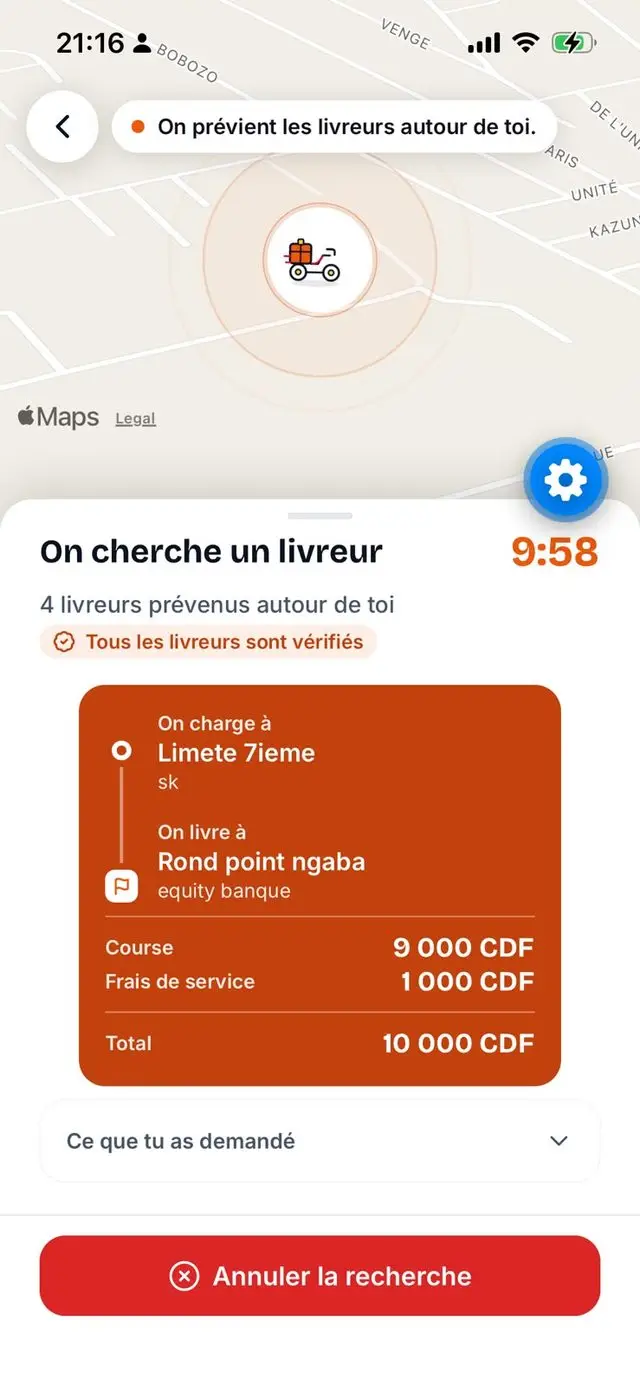
    Looking for a courier

    The app offers the job to the available couriers nearby.

  3. 3

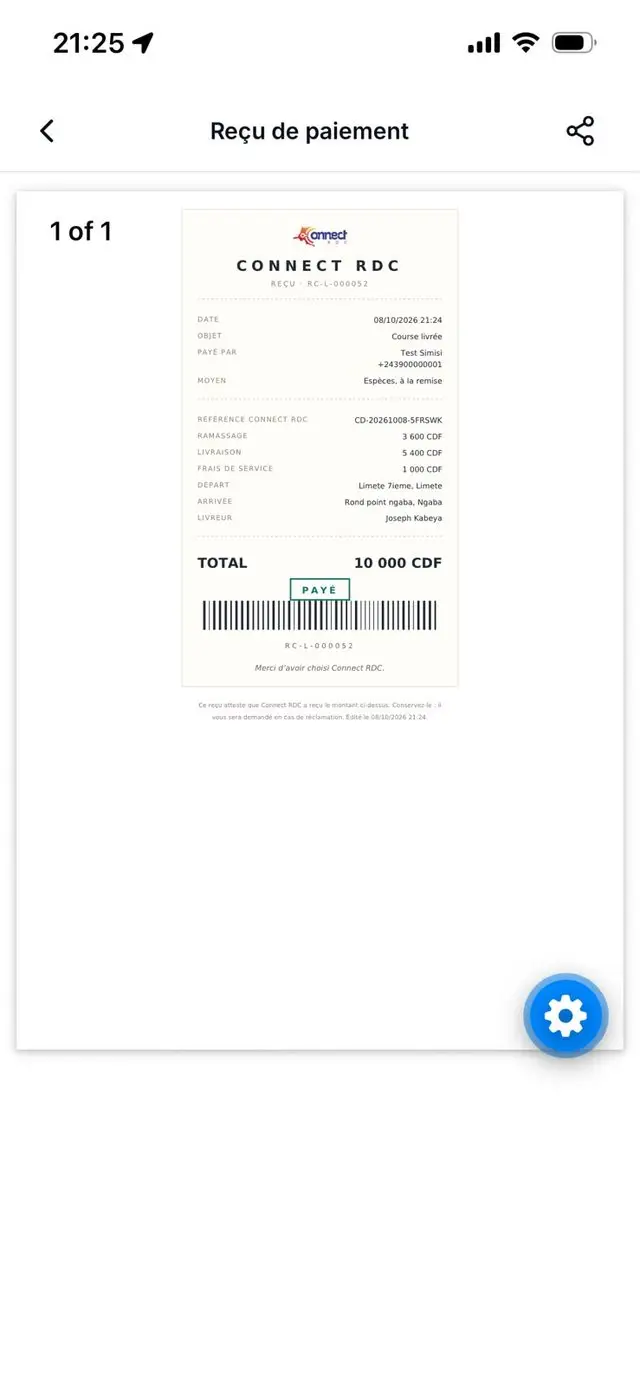
    Invoice, and the customer rates

    The invoice is generated, the ride is marked complete, the customer is notified and rates the courier.

Work with Connect RDC

No account needed. Leave your details and the team will call you back.

  • Become a courier

    You already ride. Take jobs when you want, and track your earnings.

  • Register my company

    Your couriers, your contracts and your rates, in one dashboard.

  • Become a top-up agent

    You run a kiosk. Top up couriers and earn a commission.

Three steps, five minutes. No account to create.

Work with Connect RDC

For assistants

Connect RDC, from the assistant you already use

Connect RDC speaks MCP. Your deliveries, your receipts, your revenue: just ask your assistant.

How much did my company make this week?

company-revenue

34 deliveries completed, 1,280,000 CDF. Two are still waiting for a driver.

The figures come from the server, not from the assistant: it reports them, it does not estimate them.

  1. 1

    Declare the server in your assistant

    Paste this block into your assistant MCP configuration. One address, nothing else to enter: no key, no token.

    MCP configuration
    {
      "mcpServers": {
        "connect-rdc": {
          "type": "http",
          "url": "https://connect-rdc.com/mcp"
        }
      }
    }
  2. 2

    Sign in, exactly as in the app

    On the first call, your assistant opens the Connect RDC sign-in page. You enter your number and your password or six-digit code, exactly as in the app.

  3. 3

    You authorize, and only you

    The authorization screen tells you what the assistant will be able to read. It only sees your account, under your rules: a driver never sees another driver deliveries, a company never tracks a competitor one.

Eight tools

Six read. Two prepare a request to confirm in the app.

  • driver-deliveries Read Driver

    Their deliveries, ongoing and past.

  • client-invoices Read Client

    Delivered orders, receipt link.

  • company-revenue Read Company

    Month revenue, week activity.

  • company-deliveries Read Company

    Deliveries entrusted to it, the waiting ones first.

  • company-delivery-tracking Read Company

    Where a delivery stands, where its driver is.

  • company-pricing Read Company

    Rate card, and prices per client.

  • client-pre-order To confirm Client

    Places a pre-order. No driver searched.

  • company-mission-draft To confirm Company

    Creates a mission. No driver assigned.

  • Nothing is dispatched without you

    A pre-order waits for your yes in the app. Ten minutes, then it expires.

  • No new access

    Your account rules, nothing more. No free-form query, no files.

  • The client stays protected

    Client name and number hidden outside the delivery.

  • Amounts stay in CDF

    Figures from the server. The assistant reports them, it estimates nothing.

Read the documentation

Server https://connect-rdc.com/mcp

The questions we get asked

What you need to know before installing, answered plainly.

Do I need an account to use it?

No, not to look around. Services, info and traffic open with no account. The account is created when you act, with your WhatsApp number and no email address: a code reaches you on that same channel. Your first device signs in without a code.

How much does it cost?

The app is free to download and use. For a delivery, the amount shows in CDF before you confirm, and the service fee is shown separately: it is not negotiable. Rates depend on the route, the vehicle and the company you pick.

How do I pay?

Most deliveries are paid in cash on handover. If you prefer, mobile money and card are paid directly in the app.

How do I know my parcel really arrived?

The courier cannot close the job alone: they must enter the recipient’s handover code, or scan their QR. The receipt is available right after, for you and for them.

And if something goes wrong?

You report the problem from the job itself. The dispute stays attached to that job and visible until it is closed, so nobody argues from memory.

Does it work when the network is bad?

The app is built for that: it is light, and what you already opened stays readable when the network drops. Emergency contacts and procedures remain available offline.

In which language?

French, English and Lingala, in the app and on this site. You can switch language at any time in the settings.

I want to work with Connect RDC, how?

Three roles are open: courier, delivery company, and top-up agent if you run a kiosk. You apply from the “Work with Connect RDC” page, and the team calls you back.

Let’s talk.

A question, a partnership, a report? Write, call or find us on social media.